OpenAI Codex CLI GitHub Workflow
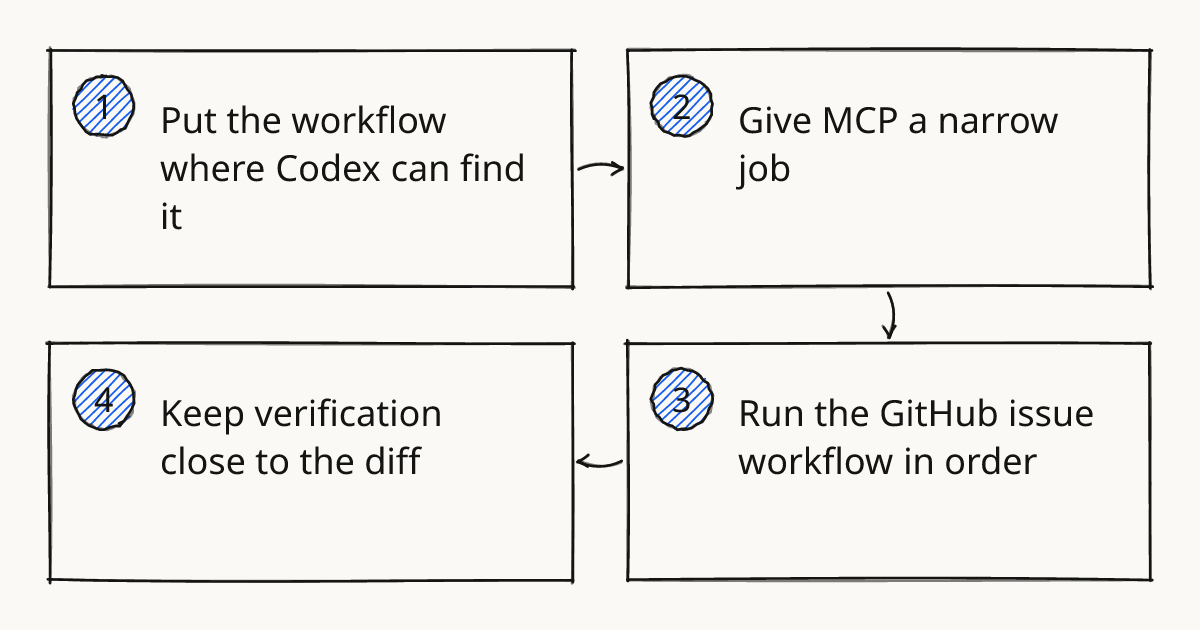
Start with the repo, not the chat. OpenAI Codex CLI is most useful when your GitHub workflow already tells the agent where to work, what rules to follow, which systems it may touch, and how the change will be verified before a human reviews it.
For teams looking at the OpenAI Codex CLI GitHub path, I would treat the official docs and the openai/codex repository as the product surface, then put your own operating model inside the repo. That means AGENTS.md for local instructions, MCP for controlled integrations, and a short verification loop that fits the way your engineering team already ships. This is the part I would cover first in an OpenAI Codex training session, because it decides whether Codex becomes a repeatable workflow or just another terminal prompt.
Put the workflow where Codex can find it
Codex CLI can help inside a local checkout, but it should not have to rediscover your project rules every time. Put durable instructions in AGENTS.md so the codex agent gets repository context before it starts editing.
Keep the file practical. Good instructions say how the repo is structured, which commands prove a change, which files are sensitive, and what style of answer reviewers expect.
Nested AGENTS.md files are useful when one repo contains different worlds. A frontend package, a backend package, and an infrastructure directory rarely need the same constraints.
This is also where I connect the work to our Delegate, Review, Own method. In the Build step of our methodology, the agent can write code, but the team still owns the constraints, the checks, and the decision to merge.
Rolling this out in your team?
We train engineering teams on their own codebase in two days. Codex setup, shared rules and review included.
Give MCP a narrow job
MCP is the integration layer, so give it integration-shaped work. Use it when Codex needs controlled access to GitHub issues, internal docs, a database schema, or a design source that is not already in the checkout.
Do not make the first MCP server write-capable unless you have a clear review boundary. Read-only issue and documentation access is usually enough for a first Codex MCP setup, because the coding work still happens in the repo and the write action still happens through the normal GitHub review flow.
A reasonable first workflow is small: Codex reads the GitHub issue, inspects the repo, proposes a plan, edits one area, runs the checks, and writes a review note. If you want the deeper MCP setup, I would pair this article with Use MCP Servers in Codex CLI.
Run the GitHub issue workflow in order
Use Codex CLI as a repo worker with a predictable loop. The order matters more than the prompt wording.
- Open the GitHub issue or PR you want to work on.
- Ask Codex to inspect the relevant files before editing.
- Have it state the intended change and the verification commands.
- Let it make the smallest useful change.
- Run tests, lint, type checks, or project-specific checks in the terminal.
- Ask Codex to summarize the diff against the original task.
- Paste the verification result into the PR description or review comment.
A concrete workflow I use in training rooms is a failing test issue. The repo already has a test command, so Codex first locates the failing test, explains the expected behavior, edits the implementation, runs the existing test command, and then gives the reviewer a short note with files changed and checks run. The important part is not that Codex found the answer. The important part is that the same loop works on the next issue.
For more Codex CLI patterns, keep a team page for CLI workflows rather than scattering prompt snippets in chat history.
Keep verification close to the diff
Codex output is only useful to a team when the reviewer can see what changed and how it was checked. Ask for a compact summary that names files, commands, failures, and remaining risk.
I prefer this shape:
- changed files
- reason for the change
- checks run
- checks not run, with reason
- follow-up risk
That format keeps the review focused. It also stops the agent from sounding confident when it skipped the only command that matters.
Know when Codex CLI is the wrong interface
Do not use Codex CLI for work that needs broad product judgment, unclear ownership, or hidden production context that the repo cannot express. Start with a human plan, then delegate the bounded implementation.
It is also a poor fit when the safe verification path is missing. If the repo has no tests, no build command, and no reviewer convention, Codex can still edit files, but the team has not given it a reliable way to prove anything.
That does not mean you need perfect coverage before using Codex. It means the first improvement may be adding a small verification command, an AGENTS.md note, or a safer MCP boundary before asking for larger changes.
Copy this AGENTS.md workflow block
# Codex workflow for this repo

## Scope
- Work from the current GitHub issue, PR, or task note.
- Inspect relevant files before editing.
- Prefer the smallest change that satisfies the task.
- Do not modify generated files, secrets, migrations, or deployment config unless the task explicitly requires it.

## Planning
- Before editing, state the files you expect to touch and the checks you expect to run.
- If the task is ambiguous, ask one clarifying question instead of guessing.

## MCP boundaries
- Use GitHub or documentation MCP access for reading issue context, linked discussions, and internal docs.
- Do not create issues, merge PRs, change labels, or write to external systems unless a human explicitly asks for that action.

## Verification
- Run the narrowest relevant check first.
- If available, run the package or repo-level test command before final summary.
- Report any command that was not run and explain why.

## Review note
Return a final note with:
- summary of the change
- files changed
- verification commands and results
- risks or follow-up work
Further reading
Make the next repo ready
Pick one active GitHub issue and add the AGENTS.md block above before asking Codex to edit code. If you want a coached version of that workflow, our hands-on training covers Codex CLI training for engineering teams using real repo tasks.
Train your team on Codex
Two days on your team's own repository, onsite or remote, with a written proposal before you commit.
Book a callPrefer to measure first? Take the free team check.