Codex CLI 0.168.0 Improves TUI Workflows
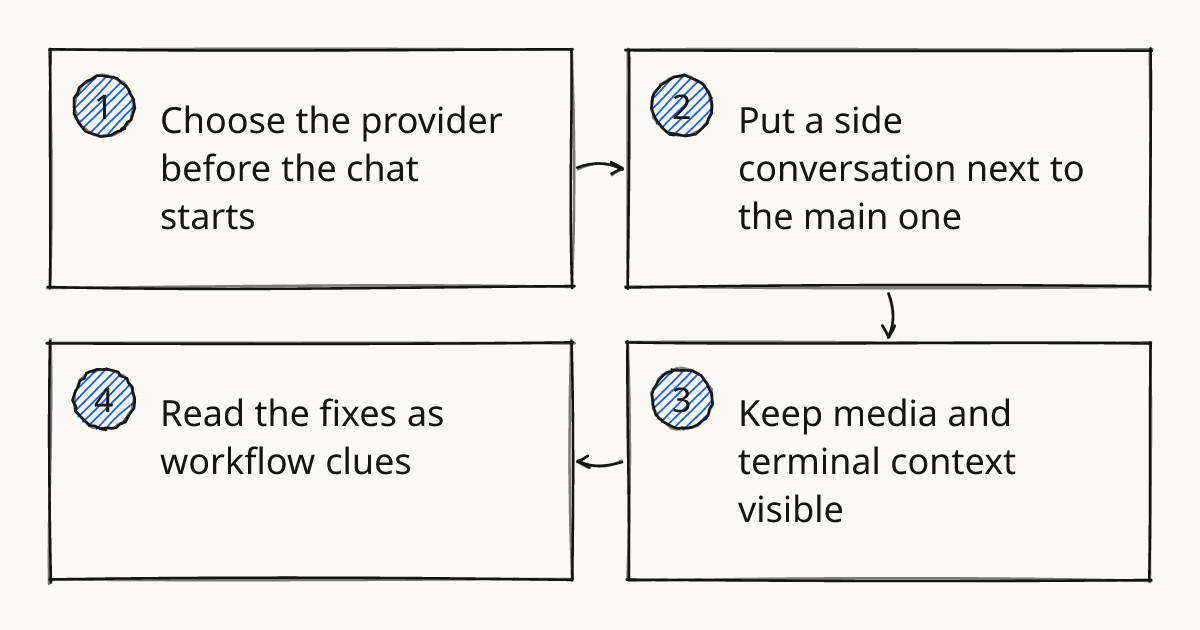
Codex CLI 0.168.0, published by @openai, is a workflow release more than a model release. It lets developers choose a default model provider for new chats, view a side conversation beside the main chat, attach recordings with audio-capable models, and keep more local terminal state intact. For readers arriving through a Codex CLI GitHub search, the release note is the clean entry point, and the repository is where the linked issues and pull requests live.
Choose the provider before the chat starts
The visible new setting is under Sessions → Model providers. Codex can now browse model providers there and choose the default for new chats.
The important detail is what changes after that. Open and resumed chats keep their saved model provider after the default changes. That matters in real work because a long-running investigation should not silently switch provider just because the next chat uses a different default.
This is a small release-note line with a useful workflow boundary. New chats inherit the new choice. Existing chats keep the choice they were created or resumed with.
Rolling this out in your team?
We train engineering teams on their own codebase in two days. Codex setup, shared rules and review included.
Put a side conversation next to the main one
The features.tui_workspace flag adds a side conversation beside the main chat. The divider can be dragged to resize panes, and leader z zooms the focused pane.
That makes the terminal UI feel less like one long transcript. A developer can keep the main thread on the code change and use the side pane for a narrower question, without losing the main line of work.
There is an honest limit here. This is still behind a feature flag, so it should be treated as something to try in one existing repo before making it part of a default Codex CLI workflow. The next release, covered in Codex CLI 0.169.0 Adds Workspace Tabs, continues this direction with more workspace navigation.
Keep media and terminal context visible
Codex 0.168.0 adds recording attachments when an audio-capable model is in use. It also skips confirmed rejected recordings on later turns and uses clip duration to keep more short recordings in context.
The image side gets a separate feature flag: features.image_generation_animation. With it enabled, Codex can generate or edit animated GIFs with optional frame count and timing controls.
Fullscreen Codex also improves terminal rendering. Image previews and pets display in tmux on Ghostty and Kitty when allow-passthrough all is set. That is a narrow fix, but it removes a rough edge for people who live inside tmux.
Read the fixes as workflow clues
The bug fixes say as much about the intended shape of Codex work as the headline features. Local TUI history and resume pickers now filter newly created threads by the signed-in ChatGPT account. Replies interrupted by tool calls render as one Markdown message, and reasoning summaries are restored when a conversation is replayed.
Steering messages also reach running turns when sent during final transcript save or after switching back to a long-running chat. That is the kind of fix that matters when the agent is doing slow work and the developer needs to redirect it without starting over.
One MCP fix is worth reading carefully. Idle local MCP servers on Windows now leave filesystem I/O available to the rest of Codex. If a repo depends on local integrations, this is the line to verify after upgrading.
This sits squarely in the Review step of the Delegate, Review, Own method in our methodology: keep the agent’s context visible enough that the human can still inspect the path, correct it, and own the result. For more Codex release notes and repo patterns, the related CLI workflows page keeps the focus on working habits rather than feature lists.
What to try first in one repo
Use the exact install command from the changelog, then test the release against a repo that already has real history and at least one integration path.
npm install -g @openai/codex@0.168.0
| Check | What to do | What should be true |
|---|---|---|
| Provider persistence | Change the default provider, then resume an older chat | The resumed chat keeps its saved provider |
| TUI workspace | Enable features.tui_workspace and open a side conversation |
The side pane can be resized, and leader z zooms the focused pane |
| Local integration | On Windows, leave a local MCP server idle while Codex works with files | Filesystem I/O remains available to Codex |
This is also the practical place to connect the Codex CLI GitHub trail to the release. Use the changelog to decide what changed, then use the repository links when a fix affects a workflow you actually depend on.
Further reading
Upgrade with one narrow check
Upgrade in one active repo and verify provider persistence before changing how you use the TUI. If that passes, test the workspace pane or the MCP fix that matches your day-to-day Codex work.
Train your team on Codex
Two days on your team's own repository, onsite or remote, with a written proposal before you commit.
Book a callPrefer to measure first? Take the free team check.